Parallel Claude Code Sessions with Git Worktrees
Built-in worktree support means each Claude agent gets its own isolated copy of your repo. No more stepping on your own toes.
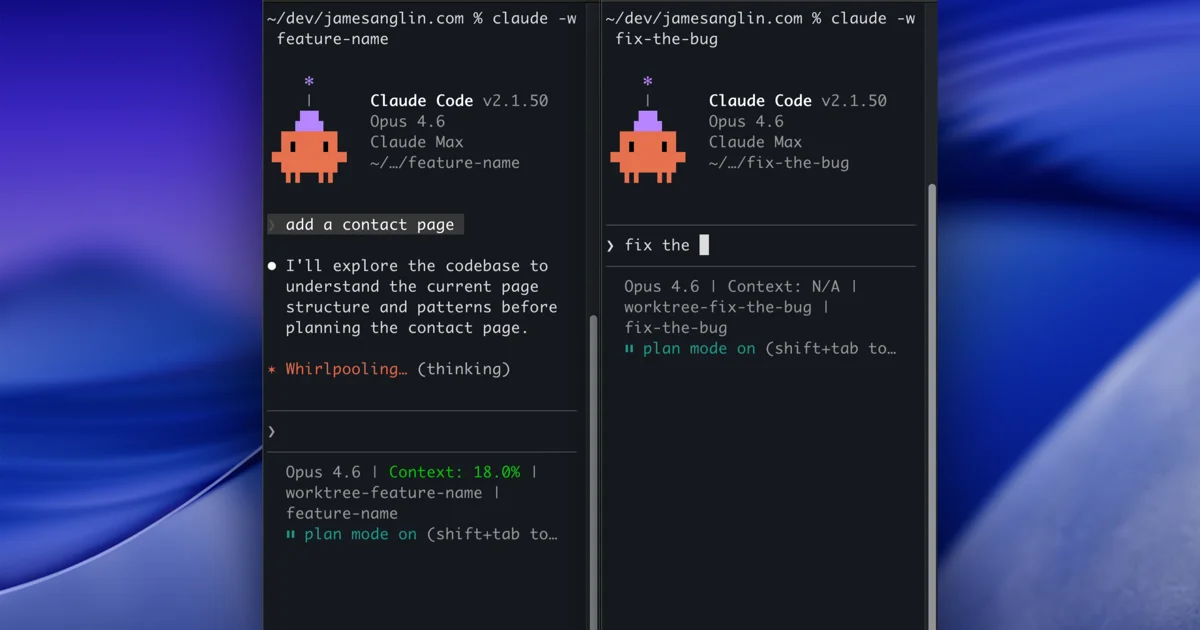
You're mid-session. Claude is refactoring your auth module across five files. Then you remember there's a bug in prod that needs a hotfix right now. Your options? Kill the session. Stash everything manually. Or just... wait.
This is the single-session bottleneck. You can't run two Claude Code sessions on the same repo without them stomping on each other's changes. It's like sharing a desk with someone who keeps rearranging your papers.
Git worktrees solve this at the filesystem level. Separate working directories, each on their own branch, all sharing the same .git history. Claude Code has built-in support for them now.
The Flag
claude --worktree feature-authThat's it. Claude creates an isolated working copy at .claude/worktrees/feature-auth/ with its own branch (worktree-feature-auth). Your main working tree stays untouched.
Don't want to name it? Let Claude pick:
claude --worktreeYou'll get something like bright-running-fox. There's a short alias too:
claude -w feature-authEach worktree session is independent. Different branch, different file state. You can have one session building a feature while another fixes a bug, and they'll never interfere.
Parallel sessions with tmux
Pair --worktree with --tmux and you can spin up multiple agents in separate tmux panes, each working in its own worktree:
claude -w auth-refactor --tmux
claude -w fix-nav-bug --tmux
claude -w add-tests --tmux
Three agents, three isolated copies of your repo. Check in on each pane when you want. This is where it starts to feel like managing a small team instead of babysitting a single process.
Subagent Isolation
If you're using the Task tool with subagents, you can give each one its own worktree with the isolation option:
isolation: worktreeEach subagent gets a throwaway working copy. If the subagent makes no changes, the worktree is cleaned up automatically. If it does, the worktree path and branch are returned in the result. Useful for parallel migrations, module-level refactors, anything where multiple agents need to touch files without conflicting.
Cleanup
Worktrees aren't permanent clutter. If an agent finishes without making changes, the worktree is auto-removed. If there are changes, Claude prompts you to keep or remove it. You merge the worktree branch back into your main branch like any other feature branch.
It's worth adding .claude/worktrees/ to your .gitignore so the directory doesn't show up as untracked noise:
echo ".claude/worktrees/" >> .gitignoreMy Setup
I'm combining this with the plan-mode-then-YOLO workflow from a previous post. Spin up two or three worktree sessions, each in plan mode. Review each plan. Then Shift+Tab them into bypass mode and let them run in parallel.
It's not quite "hire three engineers" territory, but it's closer than anything else I've tried. Isolation is what makes parallelism safe. Without it, you're just creating race conditions with extra steps.
For the full details, check out the official worktrees documentation.
Happy clauding.
Stay in the loop
Get new posts delivered to your inbox. No spam, unsubscribe anytime.